The three workflows every marketing team should start with
If you're not sure where to begin, start here:
1. Reporting automation
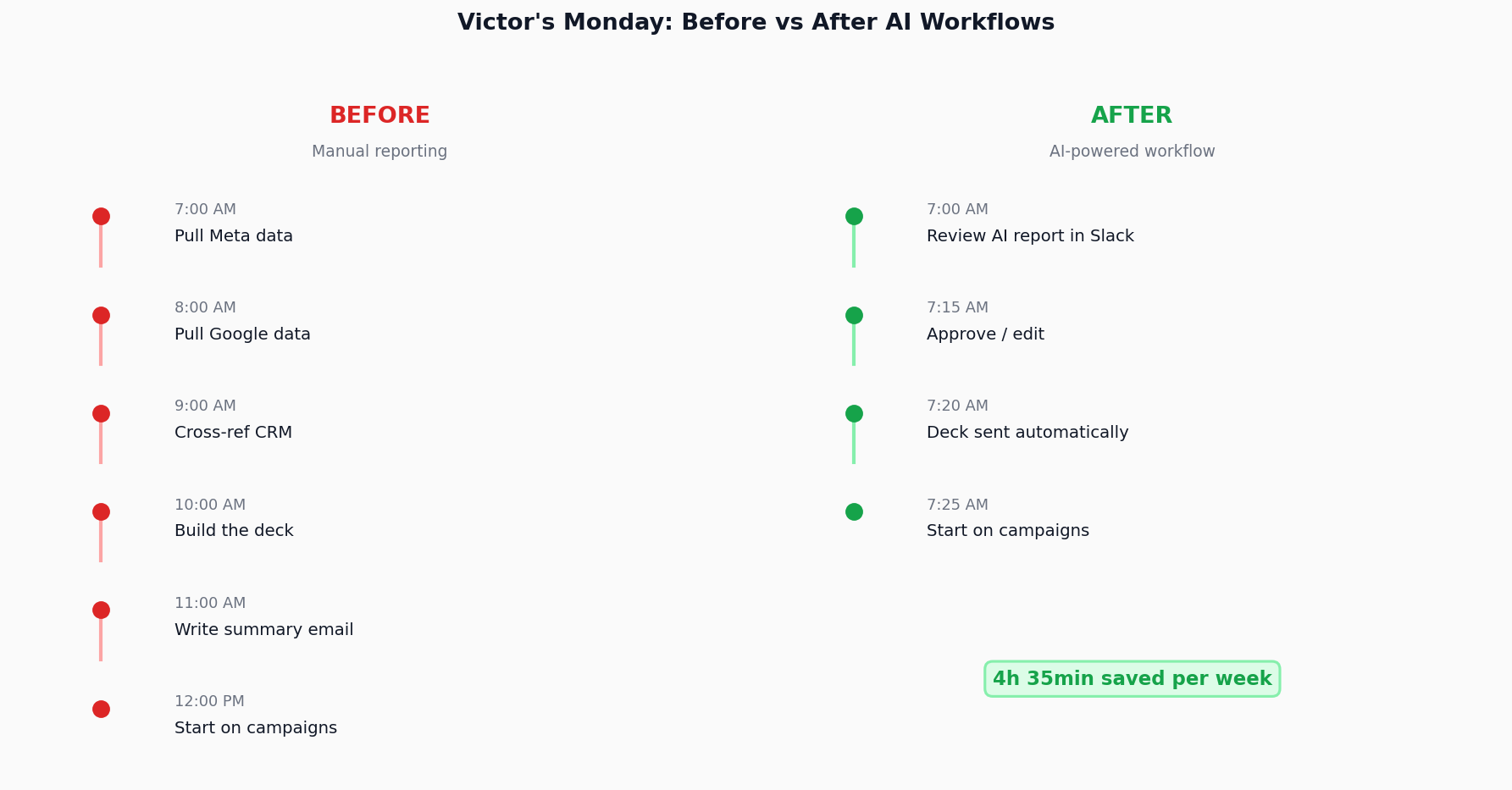
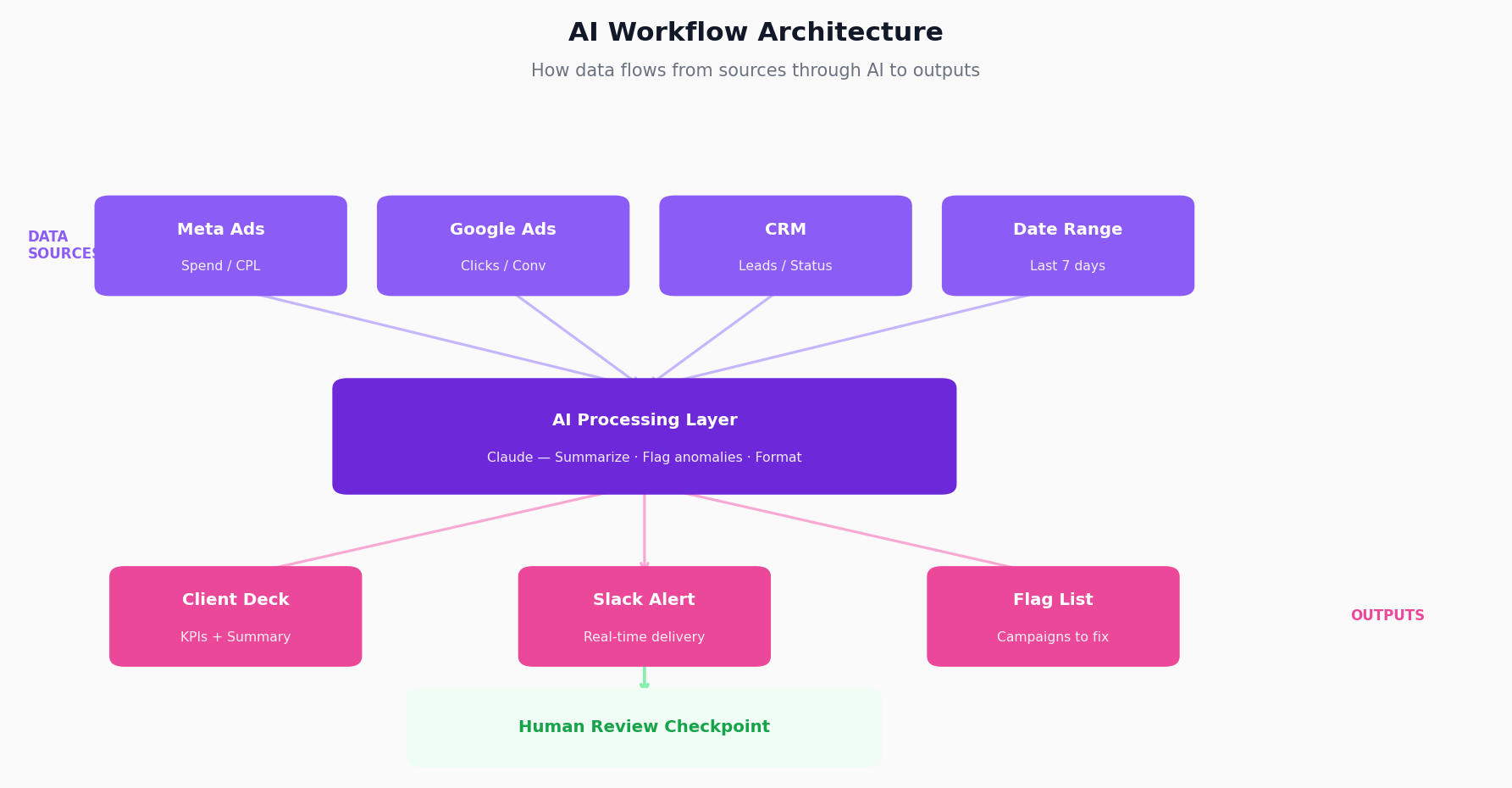
Take your weekly or monthly report. Break it into inputs and outputs. Connect your data sources to an AI that formats and summarizes. Add a human review step before delivery.
Time savings: 4-8 hours per week, depending on client load.
2. Meeting-to-action extraction
Record your team calls and client calls. Feed the transcript to AI with instructions to extract: decisions made, action items, and who's responsible for what.
We use this at Sucana. After every call, a summary appears in Slack with tasks assigned. Nobody forgets what was agreed.
Time savings: 30 minutes per call, plus fewer "wait, what did we decide?" conversations.
3. Content ideation from conversations
Every call you have contains content ideas. Problems clients mention. Questions they ask. Workarounds they've built.
Feed your transcripts to AI with instructions to pull out: pain points, questions, and insights worth sharing.
This is how I generate most of my LinkedIn content. I don't sit in front of a blank page. I mine conversations for real stories.
What doesn't work for AI workflows
Not every task should be automated. Some things need human judgment all the way through.
Strategy calls: AI can transcribe and summarize. It shouldn't decide what to say.
Creative direction: AI can generate options. It can't tell you which one fits your brand.
Client relationships: AI can draft emails. It shouldn't send them without review.
Crisis response: When something breaks, a human needs to own the decision.
The pattern: anything that requires judgment, context, or relationship building stays human. Anything that's data transformation and formatting can go to AI.
Common mistakes to avoid
Mistake 1: Starting with the tool instead of the problem
I see this constantly. Someone discovers a cool AI tool and tries to find ways to use it. That's backwards.
Start with the task that wastes time. Then find the tool that solves it.
Mistake 2: No human checkpoint
AI will confidently tell you wrong things. If you let it ship without review, you will embarrass yourself.
Always have a human look at outputs before they go external.
Mistake 3: Vague prompts
"Summarize this" is not a prompt. "Extract the three main action items, list the owner of each, and flag any deadlines mentioned" is a prompt.
Be specific. Be explicit. Treat the AI like a new hire who needs detailed instructions.
Mistake 4: Trying to automate judgment
AI is great at data transformation. It's bad at knowing when to break the rules.
If a task requires intuition, keep a human in the loop.
How to know if your workflow is working
After 30 days, check these metrics:
Time saved: Measure the actual hours reclaimed. If it's less than you expected, something's broken.
Error rate: Are you catching mistakes in the human review step? If errors are common, your prompts need work.
Adoption: Is the team actually using it? If they've gone back to manual, the workflow doesn't fit their needs.
Quality: Is the output as good as the manual version? If quality dropped, you've automated too much.
The goal isn't to automate everything. The goal is to automate the parts that don't need human judgment, so humans can spend time on the parts that do.
What's next
Once you have your first three workflows running, you'll start seeing patterns.
Data moves through your marketing stack in predictable ways. AI can intercept it at each stage, transform it, and pass it along.
The question becomes: where else is my team spending time on tasks that AI could handle?
Keep a running list. Every time someone complains about a repetitive task, write it down. Every time you catch yourself doing the same thing for the tenth time, write it down.
That list is your roadmap.
Frequently Asked Questions
How do I start using AI in my marketing workflow?
Pick one task that takes hours, happens every week, and follows the same steps each time.
Map out what goes in and what comes out. Connect your tools through Claude Code or custom scripts. Add an AI agent to process and summarize.
Build in a human review before anything goes external.
What tasks should I automate with AI first?
Start with reporting.
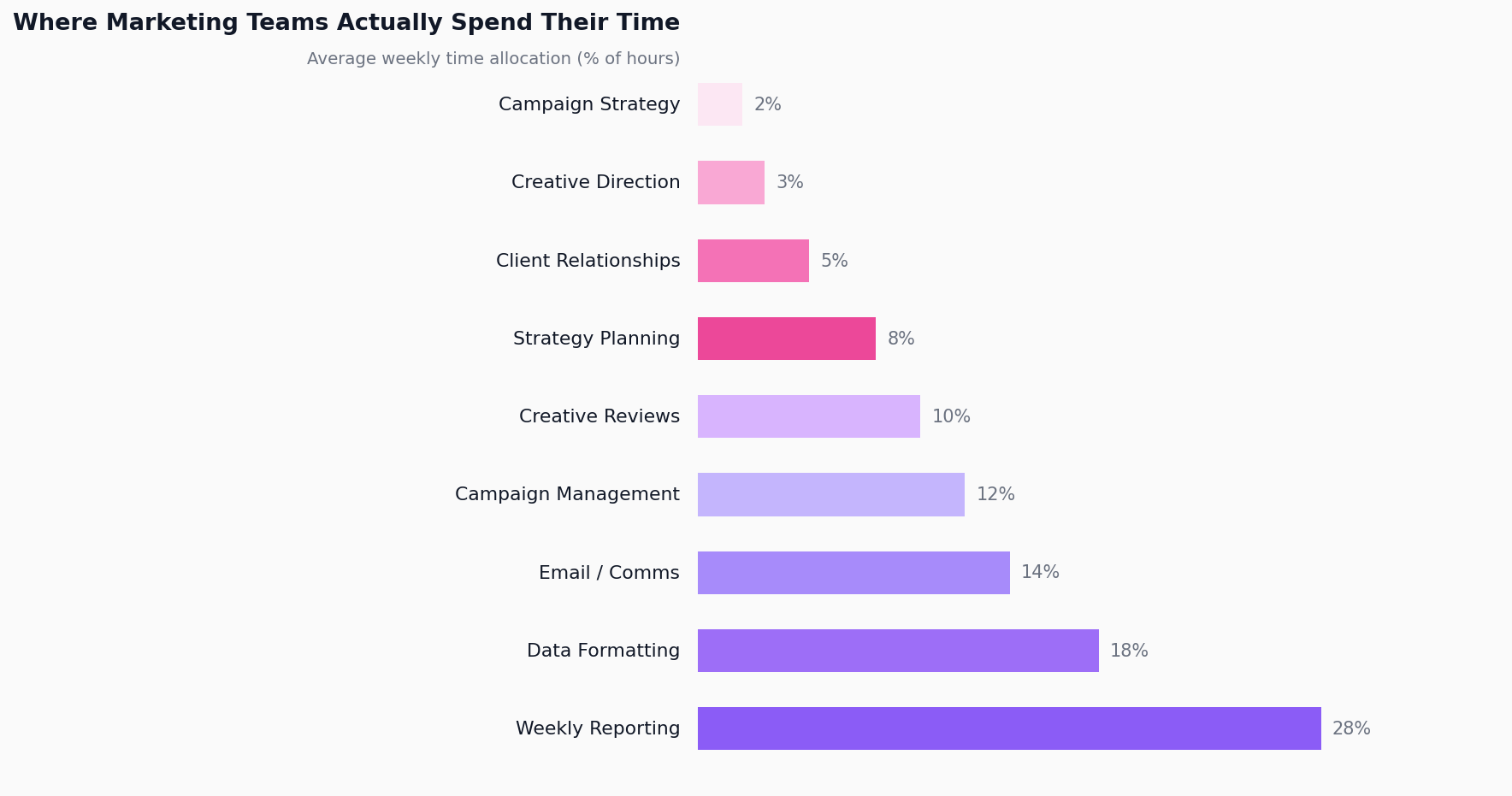
It's the clearest example of data transformation: numbers from multiple sources, formatted into a deliverable. Most teams spend 4-8 hours per week on this. AI can do it in minutes. Once your workflow runs clean, turn it into an AI SOP for your agency so anyone on the team can trigger it.
How long does it take to see results from AI workflows?
If your workflow is well-scoped, you'll see time savings in the first week.
Most teams report 4-6 hours saved per week within 30 days. Payback period for setup time is usually one to two weeks.
Can AI replace my marketing team?
No.
AI handles data transformation and routine tasks. It doesn't handle strategy, judgment, relationships, or creative direction.
The best teams use AI to free up time for the work that actually requires human thinking.
What tools do I need to build AI marketing workflows?
You need four layers:
-
Data layer (ad platforms, CRM)
-
Connection layer (Claude Code, n8n, custom scripts)
-
AI layer (Claude, custom agents)
-
Output layer (Slack, email, docs)
Most teams already have most of this. The new piece is connecting them. I compared the options in my review of AI marketing automation tools.
What if AI makes mistakes in my workflows?
It will.
That's why every workflow needs a human checkpoint before anything goes external. Catch mistakes at the review stage, then improve your prompts based on what went wrong.
Error rates drop significantly after the first month.
How do I get my team to actually use AI workflows?
Start with the task they hate most.
When they see 4 hours of weekly reporting disappear, adoption isn't a problem. The key is solving a real pain point, not adding a new tool for its own sake.
How detailed do my AI prompts need to be?
Very detailed — at least at first.
Think of it like onboarding a new hire. They need to know exactly what output you want, what format to use, and what to do when something's missing. Vague instructions produce vague results. The more specific your prompt, the less editing you'll do on the output.
How do I know which workflows are worth building?
Use the four-criteria test: is it repeatable, data-driven, time-consuming, and low-judgment?
If a task hits three out of four, it's worth automating. If it requires gut feel, client context, or creative judgment, keep a human in the loop. The highest-ROI workflows are the ones that are both repetitive and painful — the tasks your team dreads every single week.
What's the difference between AI automation and just using ChatGPT?
ChatGPT is a tool. An AI workflow is a system.
When you open ChatGPT and paste in data manually, you're still doing the work — just with a faster writing assistant. A real workflow connects your data sources, triggers automatically, runs the AI processing, and delivers the output to the right place without you touching it. The goal is removing yourself from the repetitive parts entirely.