
Prompt drift kills quality
I noticed our client summaries getting blander over two months. Same prompt, same structure, but the output kept getting more generic. Traced it back to a model update that shifted how Claude handled the formatting instructions.
The prompt that was tuned for one context slowly stops working in another. You do not get an error message. You just get worse results.
Silent failures are the worst
The agent looks like it is working. Reports go out on time. But the numbers are wrong because a data source changed format.
I caught one of these when a client asked why their ROAS looked different from their own dashboard. The agent had been pulling stale data for two weeks.
Scope creep makes maintenance worse
I went from one agent to five in three weeks. The maintenance almost ate the time I saved. Each one needs monitoring, updating, and fixing when something breaks.
How I protect against all of this: pin API versions so updates do not break things silently. Review agent output weekly, not monthly.
Set up alerts for when output changes shape. And keep a log of every agent, what it does, and when it last broke.
How We Structured the Architecture
Most people treat AI as one chatbot that does everything. That does not scale.
At Sucana, I built separate agents for separate jobs. One handles my calendar, email, and messaging. Another handles deployments, automation pipelines, and system monitoring. A third one is just memory: it stores what the team knows so any agent can look it up.
Each agent has its lane. Same idea as not making one person do every job.
When the personal agent needs campaign data, it pulls from the memory agent. When the infrastructure agent deploys something, it logs the change. They do not step on each other.
All agents connect through a shared protocol and read from the same database. Not scattered across ten different tools. One source of truth.
One AI assistant that does everything breaks in unpredictable ways. Small agents with clear jobs let you fix the one that broke without touching the rest.
Start with one agent. Name it. One job. When it runs clean, build the next one.
Frequently Asked Questions
How much does AI automation cost for a marketing agency?
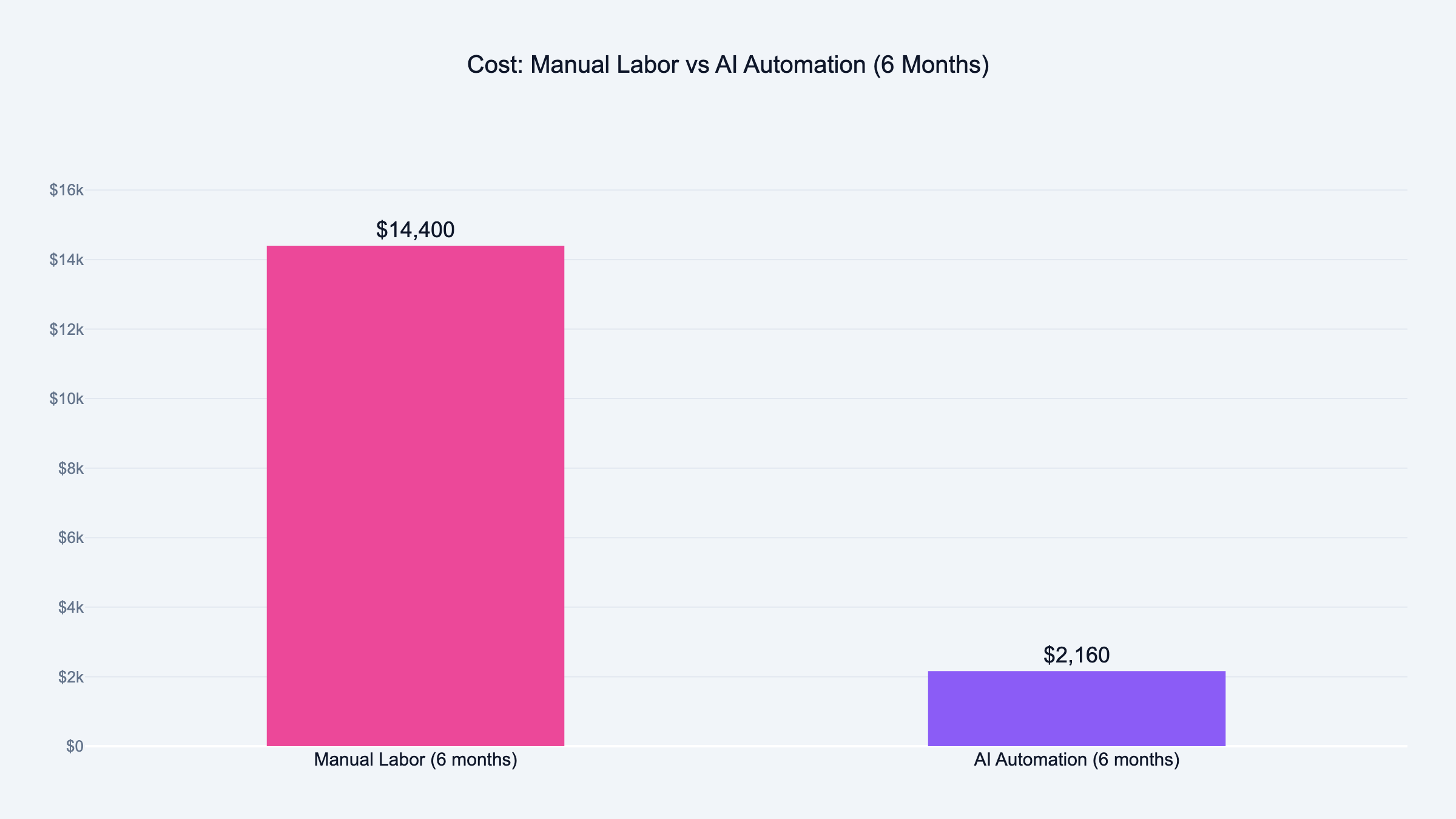
Expect $50 to $150 per month in direct costs for a small agency. That range is based on our actual monthly invoices: Claude API runs $20 to $80 per month for 3 agents, Vercel hosting is $20 per month, and miscellaneous services cover the rest. That covers API usage for one or two AI models plus a basic server to run agents. The real cost is the time to build and maintain them, which can run 10 to 20 hours for your first agent.
We broke even within 30 days on our first agent because the task it replaced was eating 4+ hours per week.
Do I need a developer to build AI agents?
No. I built our agents in Claude Code without traditional programming. The important part is knowing what the agent should do, what data it needs, and how to check its output. Those are process skills, not coding skills.
If your workflows are complex or you need custom integrations, a developer speeds things up. But the first agent does not require one.
What marketing tasks should I automate first?
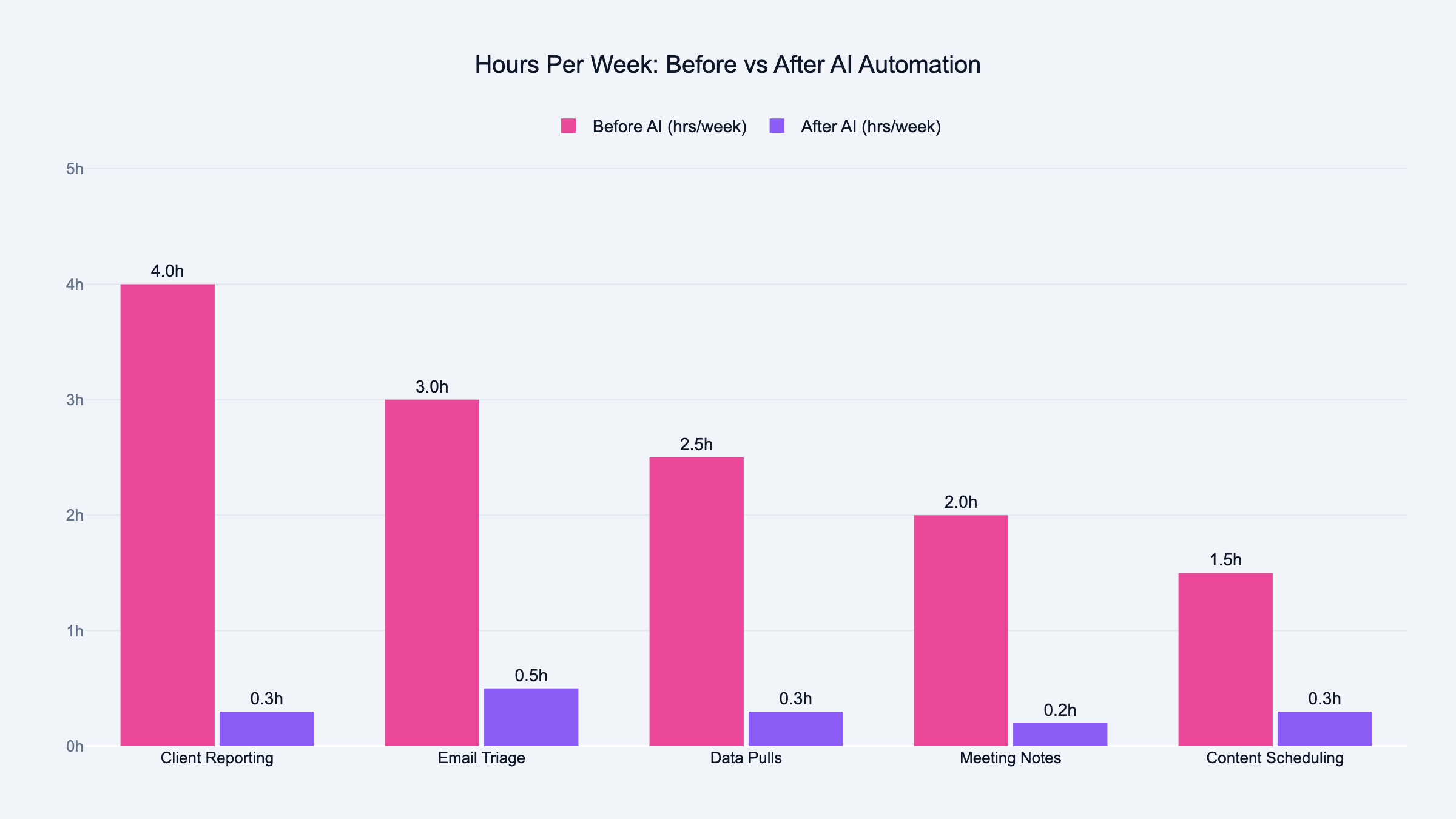
Weekly client reporting is the best starting point for most agencies. It is repeatable, data-driven, and takes hours every week. After that, look at email triage, meeting summaries, and campaign data pulls.
Stay away from strategy, creative work, and client communication. AI is bad at judgment calls and worse at relationships.
How long does it take to see ROI from AI automation?
For a well-scoped agent handling a 4-hour weekly task, I saw time savings in the first week. The setup took about two weeks of focused work. Payback on that setup time came within 30 days.
The caveat: if you pick the wrong task, you spend weeks building something nobody needed.
What is the difference between AI automation and regular marketing automation?
Regular marketing automation follows rules you set. "If someone opens three emails, move them to this list." It does exactly what you told it.
AI automation makes decisions within boundaries. "Read this campaign data and write a summary highlighting anything unusual." The AI interprets, not just executes.
What are the biggest risks of AI automation for agencies?
Silent failures are the worst. The agent runs, the output looks fine, but the data is wrong. Nobody catches it until a client complains.
Other risks: API changes breaking your setup overnight, prompt drift degrading output quality over months, and maintenance hours eating into the time you saved. Budget 2 to 4 hours per week for upkeep per active agent.
Can a solo marketer build AI agents without a team?
Yes. I started as a solo founder before Victor joined. One person can build and maintain 2 to 3 agents comfortably. Beyond that, maintenance starts competing with your actual work.
The key is starting with one agent, getting it stable, and only adding the next one when the first runs without daily attention.
How do I measure the ROI of AI automation?
Track two numbers: hours saved per week and errors caught during review. Hours saved is straightforward. If the task took 4 hours manually and now takes 30 minutes of review, you saved 3.5 hours.
Errors caught tells you how much trust to put in the agent. If you catch issues every week, the agent needs tuning. If review is clean for a month straight, you can reduce oversight.
What tools do I need to start with AI automation?
Start with Claude or ChatGPT for the AI processing. Add a database like Airtable or Google Sheets if your agent needs to remember previous runs. Use webhooks or simple scripts to connect tools together.
You do not need all of this on day one. Your first agent can be a Claude prompt that you run manually with copy-pasted data. Automate the connections later.
How many agents should an agency run?
Start with one. Get it stable. Then add a second. Most small agencies run 3 to 5 agents comfortably. Each one handles a specific task: reporting, data pulls, email triage, content scheduling.
The mistake is building too many too fast. Every agent needs monitoring and maintenance. Five agents with 2 hours of weekly maintenance each is 10 hours, half of the time they were supposed to save.