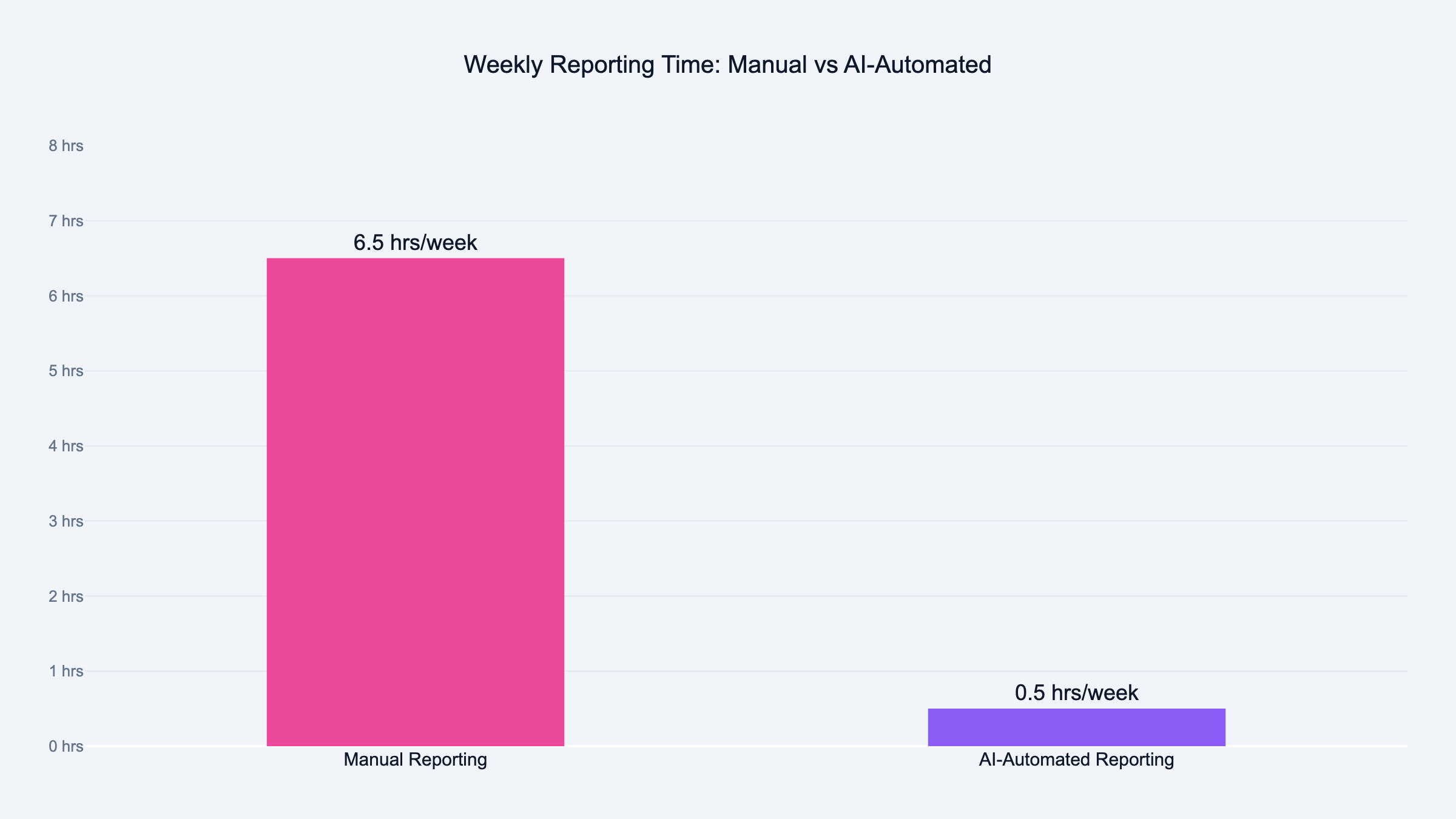
Read the report. Every time. It should take you five minutes instead of 45. That is the win. The AI writes the draft, you check it, you add the two sentences only you know, and you send.
Victor's workflow with the March 1 meeting was exactly that. The AI pulled the report, he reviewed it, he trusted the data, he walked in confident. That is the goal.
Not zero human involvement. Less human time on the wrong things.
What to Do When the Report Is Wrong
You will run into this. An AI report that gets something backward, or flags the wrong campaign, or uses language the client will not understand.
When that happens, do not throw out the automation. Fix the prompt.
Nine times out of ten, the error is in the instructions, not the AI. Go back to your prompt and add more context. If it described a paused campaign as a success because CPL went down, fix the prompt. Add: "If a campaign has zero spend, note it was paused. Exclude it from performance comparisons."
Prompt engineering for reporting is just specificity. The more precise the instructions, the more reliable the output. Treat every wrong report as a bug report on your prompt. I wrote a practical guide to AI prompt engineering for PPC that covers the full system.
Frequently Asked Questions
What tools can automate client reporting with AI?
The tools that work best connect directly to your ad platforms. No manual exports needed.
Sucana reads campaign data and generates AI reports automatically. Make.com and n8n pull data from Google Ads, Meta, and other platforms. They pass it to an AI model that writes the report. AgencyAnalytics handles multi-channel reporting with some AI write-up features built in.
The right tool depends on your data sources and how technical your team is comfortable getting.
How long does it take to set up automated client reporting?
For a single client and one report type, the initial setup is typically two to four hours. That covers connecting your data source, writing the AI prompt, testing it, and running a few trial reports.
Once the first client is working, each additional client takes less time because the prompt structure is already built.
Is AI-generated reporting accurate enough to send to clients?
Yes, if your underlying data is clean and your prompt is specific. The AI reads the numbers you give it and writes what you describe.
The part that fails is usually the input, not the AI. Messy data, vague prompts, or missing context produce inaccurate reports. Clean data and a detailed prompt produce reliable ones.
Always review before sending. The review should take minutes, not hours.
What metrics should a weekly client report include?
Every report should include total spend, cost per lead, which campaigns ran, and how performance compared to the prior week. Add a short paragraph on what happened.
Optional but valuable: a recommendation for the following week. This is where AI write-ups add the most value. The AI spots trends you'd miss doing it by hand.
Can AI write the summary section of a client report?
Yes, and this is where it saves the most time. The summary section is the hardest to write. The AI drafts it for you.
Feed it the data and a few sentences of context about the client's goals. It produces a clear, plain-language write-up you can edit in seconds rather than write from scratch.
Do I need to be technical to automate client reporting?
Not anymore. Tools like Sucana are built so that non-technical users can run AI reports without connecting APIs or writing code.
If you want to build something custom using Make.com or n8n, some technical comfort helps. But the no-code versions of these tools have improved significantly. Most agency owners can build a basic reporting automation in an afternoon without a developer.
How do I handle different reporting formats for different clients?
Keep a separate prompt for each client. The prompt includes the client's name, their campaigns, the metrics they care about, and any language preferences.
This sounds like more work than it is. After the first two or three, you will have a template. Five minutes to adapt it for each new client.
What happens if my ad platform data is wrong?
The AI report will reflect that error. It has no way to know if the numbers are correct. It only sees what you give it.
This is why data validation matters before you automate. Victor's first reaction to Sucana's AI report was to check the CPL numbers manually. They matched. That cross-check is how you build confidence in the automation.
Can automated reports replace monthly strategy calls with clients?
The reports make those calls better, they do not replace them. A clean automated weekly report means you walk into the monthly call with real data. Not a spreadsheet you assembled the night before.
Clients ask sharper questions when the data is clear. That makes the call more useful, not redundant. For the bigger picture on scaling this across an agency, see my guide on building an AI-powered marketing agency.
How do I know when to add a new metric to the automated report?
Add it when you find yourself manually adding it to reports before sending. If you are adding the same extra sentence every week, update the prompt. That metric belongs in the template.
The automated report is a living document. Refine it as your client relationships evolve.
What is the difference between automating reporting and just using a dashboard?
A dashboard shows numbers in real time. An automated report takes those numbers and turns them into plain language. A client can read it without knowing what they are looking at.
Dashboards are for you. Automated reports are for clients.
Many agencies use both. The dashboard runs continuously. The AI report drops into the client's inbox every Monday morning.
Should I tell clients the report is AI-generated?
That depends on your client relationship. The report is accurate and reviewed by you before it goes out. It represents your work no matter how it was generated.
What matters is that the data is right and the write-up is useful. Clients care about whether the report tells them what they need to know. Most do not ask how it was written.