
I have seen reports that dump every metric into a table and call it done. That is not a report. That is a spreadsheet with a header.
The reports Victor sends his clients now start with a one-paragraph summary: spend, leads, cost per lead. Then a breakdown by campaign. Then the insight: which campaign is trending up and which is burning budget.
His clients do not ask follow-up questions anymore. The report answers them before they come up.
One thing worth noting: the AI is not perfect on the first try. The first report it generates needs editing. By the third or fourth run with the same prompt template, it locks in. The template does the heavy lifting.
The Accuracy Question
Every agency owner I talk to asks the same thing. Can I trust AI with client data?
I had the same concern. So I tested it.
Victor ran his campaign data through two different AI reports. Same data, different prompts, different sessions. Both came back with the same conclusion, same patterns, same framing.
He said: "It makes consistency with just random data. It keeps making the same conclusion. So that is really good. It is quite solid."
The numbers in an AI report come straight from the CSV. The AI does not invent spend figures or conversion counts. What it does is interpret them, and the interpretation is only as good as the prompt and the data.
My rule: always scan the final report before sending. The AI gets the math right. Occasionally it misreads a trend or overweights a small data set. A two-minute review catches that.
Tools That Work for Google Ads AI Reporting
I have tested several setups. Here is what I found.
Claude or ChatGPT (manual prompt): Paste the CSV, use the prompt template above. Best for teams with fewer than five clients. No setup cost.
Claude Co-Work skill: Build a custom skill that handles the full report. Drop in the CSV, trigger the skill, get the finished report. No API keys, no code. Best for agencies that want consistency without technical setup.
Sucana: Reads the campaign data directly and generates the report with AI. No CSV exports, no prompt engineering. Victor uses it for his agency. Full disclosure: I built it.
Looker Studio + AI summary layer: Use Looker for the visual dashboard. Layer an AI prompt on top for the written summary. Works, but it is two tools doing what one could do.
Each option trades off setup time against ongoing effort. The simpler the setup, the more manual work each week.
Reporting is one half of the Google Ads workflow. I cover how to use AI to write the actual ad copy in my guide on writing Google Ads copy with AI. And for a deeper look at how AI reads and interprets campaign numbers, see how Claude reads campaign data like a senior media buyer.
Frequently Asked Questions
How do I automate Google Ads reporting?
Export your campaign data as a CSV from Google Ads. Feed it to an AI model with a structured prompt that includes client context and reporting goals.
For a repeatable setup, build a custom skill in Claude Co-Work. The skill saves the prompt template, report structure, and rules. Trigger it each week with fresh data.
Can AI write Google Ads reports for clients?
Yes. AI can take raw campaign data and write a clear performance summary. It covers spend, conversions, cost per lead, trends, and recommendations.
The output needs a quick review before sending. I spend about two minutes scanning each report. The AI handles 95% of the work.
What tools automate Google Ads reporting with AI?
Claude and ChatGPT handle manual reporting with a prompt template. Claude Co-Work takes it further with custom skills that save the workflow.
Dedicated platforms like Sucana offer built-in AI reporting with no prompt engineering needed. The right tool depends on how many clients and how much setup time is available.
How long does it take to set up automated Google Ads reporting?
The manual prompt approach takes 10 minutes to set up. Save a prompt template, paste fresh data each week.
Building a Claude Co-Work skill takes about an hour. After that, each report takes five minutes to trigger and review.
Is AI reporting accurate enough for client delivery?
The numbers come directly from the CSV export. AI does not invent data points. It reads what is there and summarizes it.
The interpretation is where I double-check. A quick scan catches any misread trends. Victor trusts his reports enough to use them in meetings worth millions.
Can I automate Google Ads and Meta reporting together?
Yes. Export CSVs from both platforms. Include both data sets in the same prompt with labels.
Build a Claude Co-Work skill that accepts both data sets. The AI compares performance across channels in a single report.
What data should an automated PPC report include?
I keep it to the metrics clients actually care about: spend, conversions, cost per conversion, and ROAS. Campaign-level breakdowns show where the budget went.
Add a trend line, week over week, and one recommendation. Clients want to know what happened and what to do about it. Everything else is noise.
How much time does automated reporting actually save?
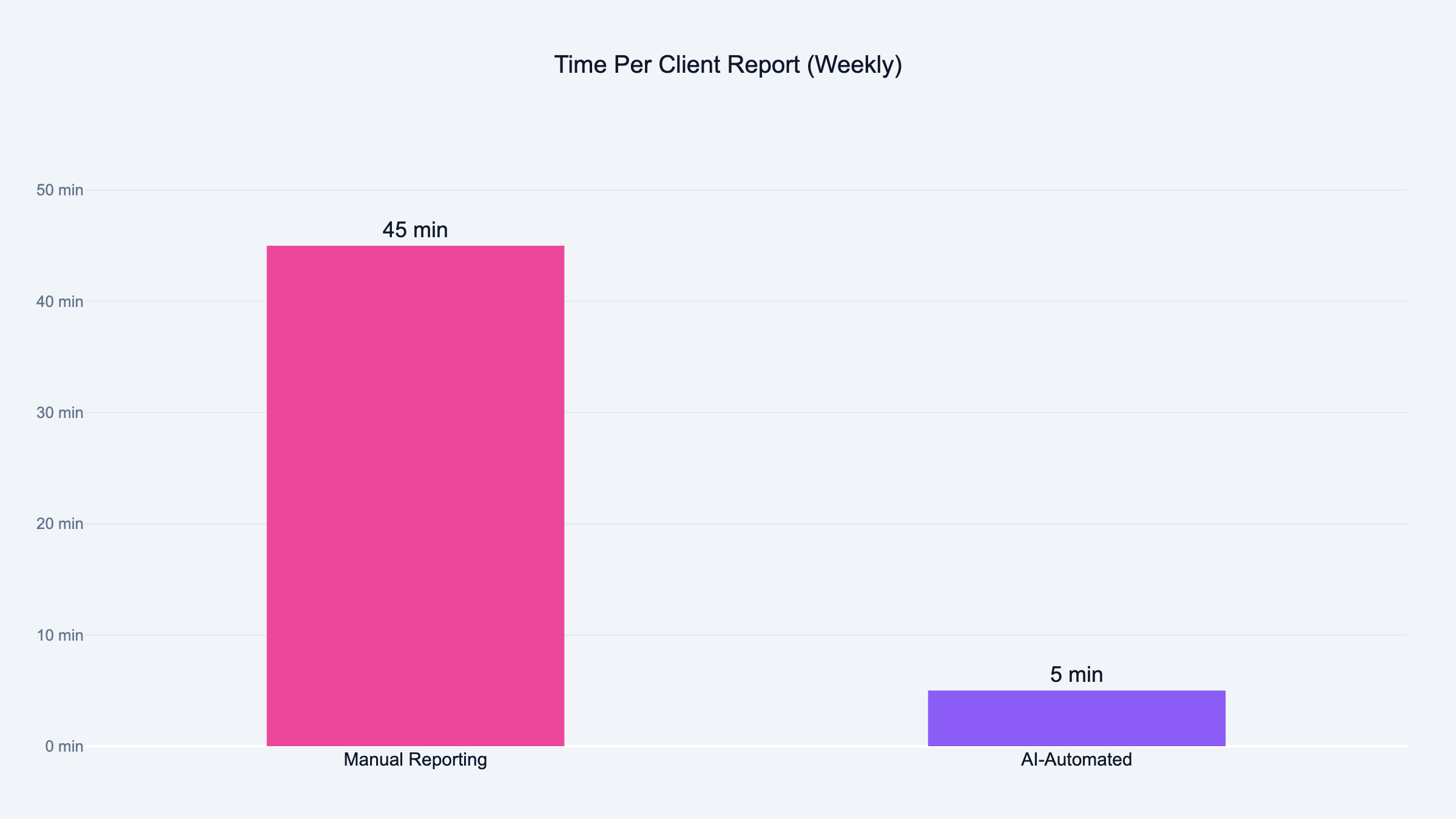
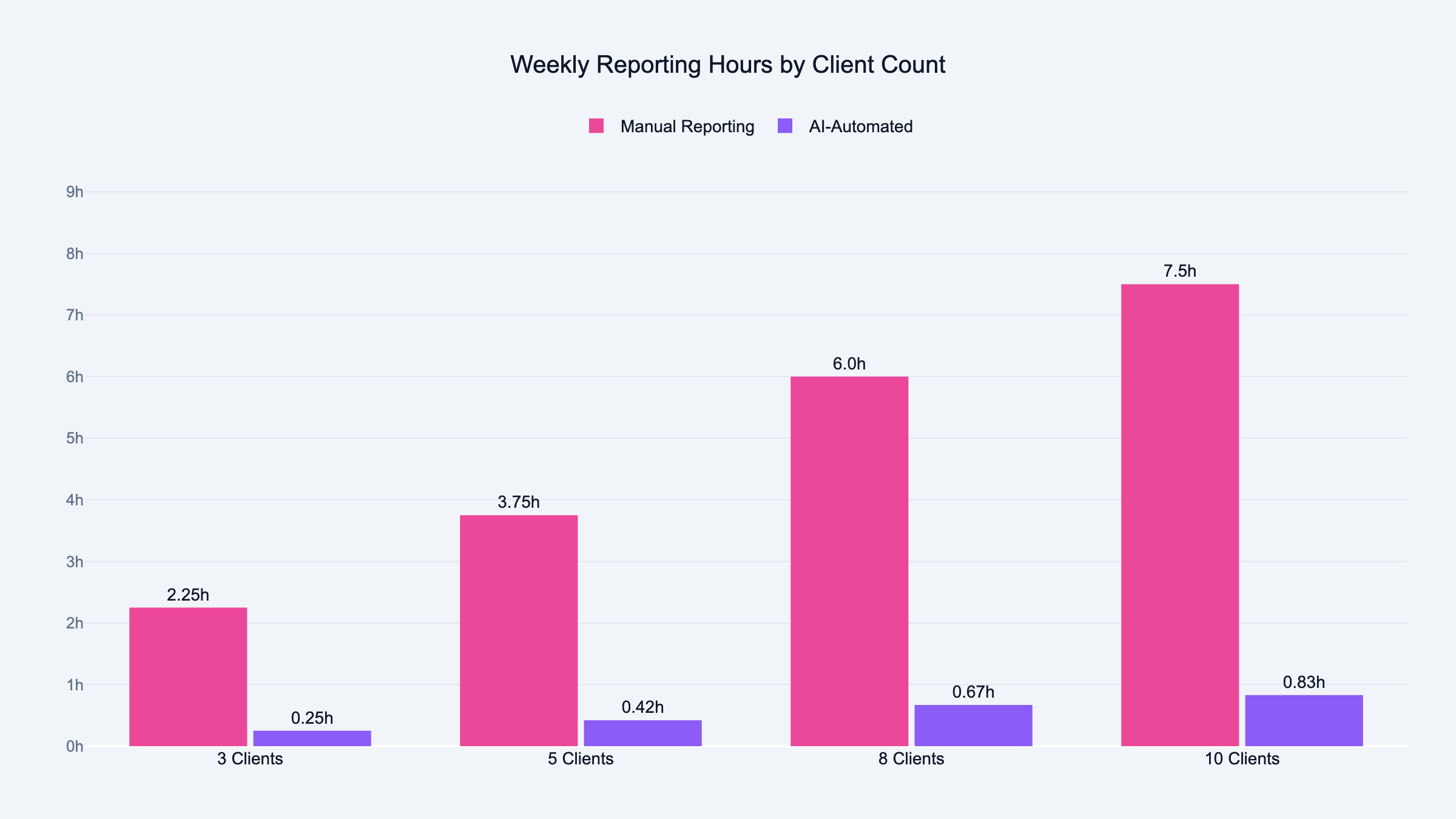
Manual reporting takes 30 to 60 minutes per client per week. With AI, that drops to 5 minutes for a review.
An agency with 10 clients saves 4 to 8 hours every week. Over a month, that is two full working days back. I have seen agencies reinvest that time into actual campaign work. For a bigger picture on where this is all heading, see my take on the future of PPC with AI.
Do I need coding skills to automate Google Ads reports?
Not for the basic setup. Copy the prompt template, paste your CSV, and run it in Claude or ChatGPT. No code needed.
Claude Co-Work skills are built through conversation, not code. Tell Claude what the workflow does and it builds the skill file. The only approach that needs real coding is a custom API integration or Google Ads Scripts.
What is the best AI model for PPC reporting?
I use Claude for most reporting work. It handles structured data well and writes clean summaries without filler.
ChatGPT works too, especially with the data analysis mode. Both models produce solid reports. The difference is in the prompt, not the model. I put together 15 ChatGPT prompts for PPC managers including a reporting prompt template.