How Do You Use AI to Write Google Ads Copy That Actually Converts?
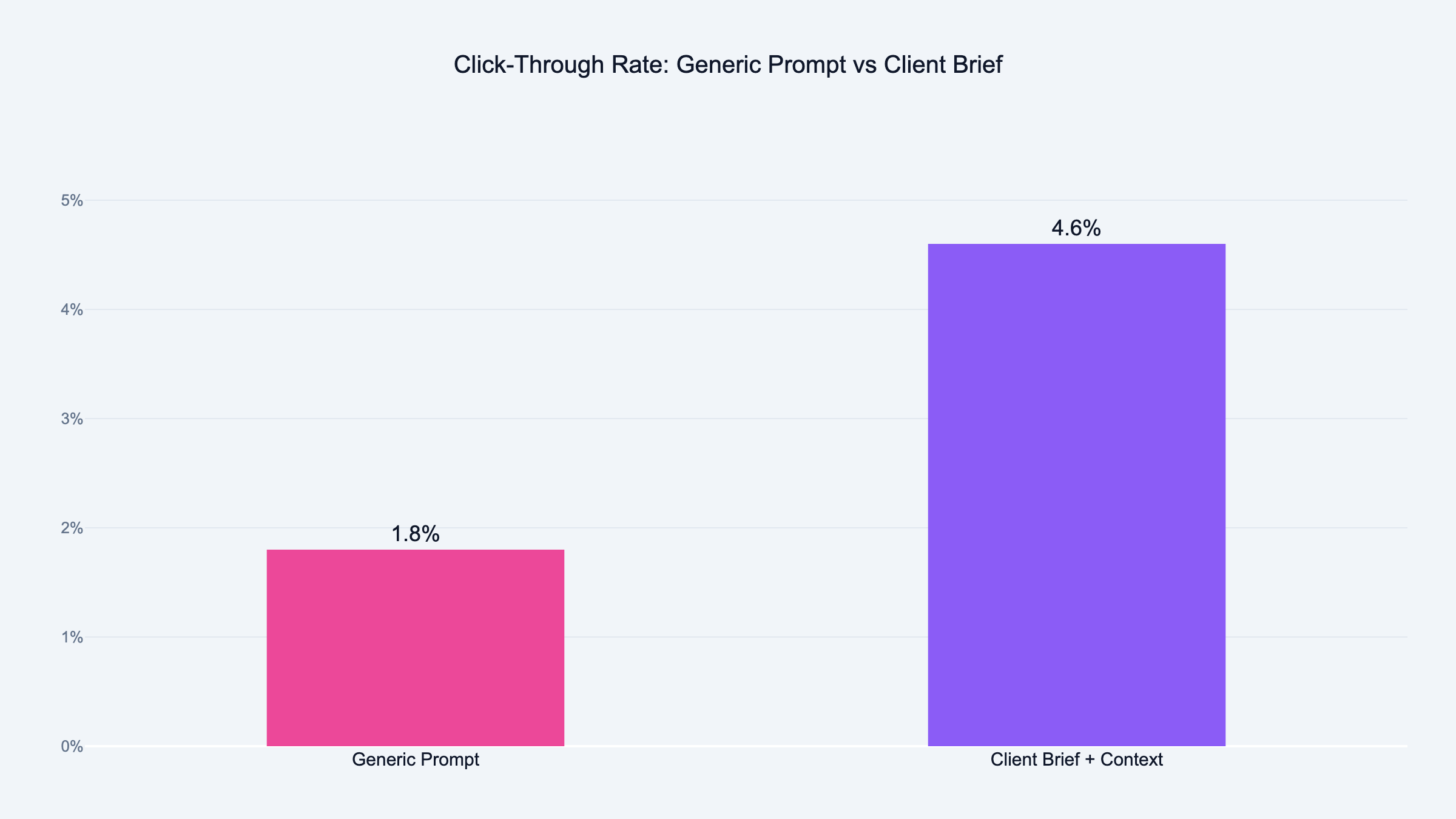
We use AI to write Google Ads copy by feeding it a tone of voice document first. Not a generic prompt. Victor and I built this process after watching AI produce 47 identical headlines. The key is giving AI your client's real language, then testing variants against manual copy with live traffic data.
You start with a tone of voice document.
Not a prompt. Not "write me 5 headlines." A document that captures who your client is and how they talk.
I had to learn this the hard way. Victor and I were sitting in front of his laptop, staring at a Google Ads account with 47 headlines that all sounded like they were written by the same robot. "Grow Your Business Today." "Proven Results for Your Company." "Get Started Now."
You know the type. You've seen them a thousand times. You've probably scrolled past every single one.
Victor was frustrated. I could see it in his face. He'd been feeding Claude prompts for an hour and nothing felt right. Everything sounded like it could belong to any company in any industry.
Then something clicked.
He pulled up the client's website, copied two paragraphs of how the founder actually talks, pasted three ads that were already converting, and added a description of who they sell to.
Nothing changed except the input. The output was completely different.
Headlines mentioned specific pain points. The language matched how the client actually talks. It felt like someone who knew the business wrote them.
That was the moment I realized: the problem was never the AI. The problem was always the brief. That lesson applies to every stage of AI in performance marketing, not just ad copy.
Step 1: Build the Client Brief
This is where most people skip ahead. They want the ads. They don't want to build the brief.
But the brief is the entire game.
You might recognize the feeling. You open Claude, type "write me Google Ads headlines for my client," and expect magic. I did the same thing. It doesn't work.
First thing I do is pull the search terms report from the client's Google Ads account. I grab the last 90 days. I want to see what people actually typed before they clicked. Those words tell me more about the audience than any persona document ever will.
No history? I pull competitor ads using the Google Ads Transparency Center. Free tool. Shows you what competitors run right now.
Then I build the brief from three pieces:
Tone of voice document:
How does this client talk? Formal or casual? Industry jargon or plain language? I pull this from their website, their emails, and ideally from a conversation with the founder. Two paragraphs is enough. You're not writing a novel. You're giving the AI a voice to match.
ICP description:
Who are they selling to? Not "small business owners." That means nothing to an AI. I mean: agency owners doing $50K to $200K per month in ad spend. Drowning in manual reporting. Losing clients because they can't show results fast enough. That level of detail changes everything.
Three converting ads:
Pull three ads from the account that already work. Best CTR, best conversion rate, whatever metric matters. Paste them into the brief. Tell Claude: "These ads convert. Match this style and tone."
Don't copy them. Write new variations that feel the same.
That's it. One page. Takes 15 minutes to build.
I know what you're thinking. Fifteen minutes? I don't have time for that. Trust me. Those 15 minutes save you hours of rewriting generic output that sounds like every other ad on the internet.
I've tested them all. ChatGPT, Gemini, Claude. Side by side, same ad briefs, same clients.
Claude wins.
At the time of writing, Claude is the best writer among all major LLMs. It produces copy that sounds more natural. It follows character limits better. It needs fewer edits before the ad is ready to run.
ChatGPT tends to over-explain. It gives you headlines that read like mini-paragraphs. Gemini is fast but often misses the emotional hook.
Claude gets the constraint. It understands that a Google Ads headline has 30 characters and a description has 90. It writes within those limits without three reminders.
That said, the tool matters less than the input. A great brief in ChatGPT beats a lazy prompt in Claude every time.
But if you give both the same brief? Claude wins. I use it for all ad copy work now.
Step 3: Write Ads by Awareness Level
This one changed everything for me.
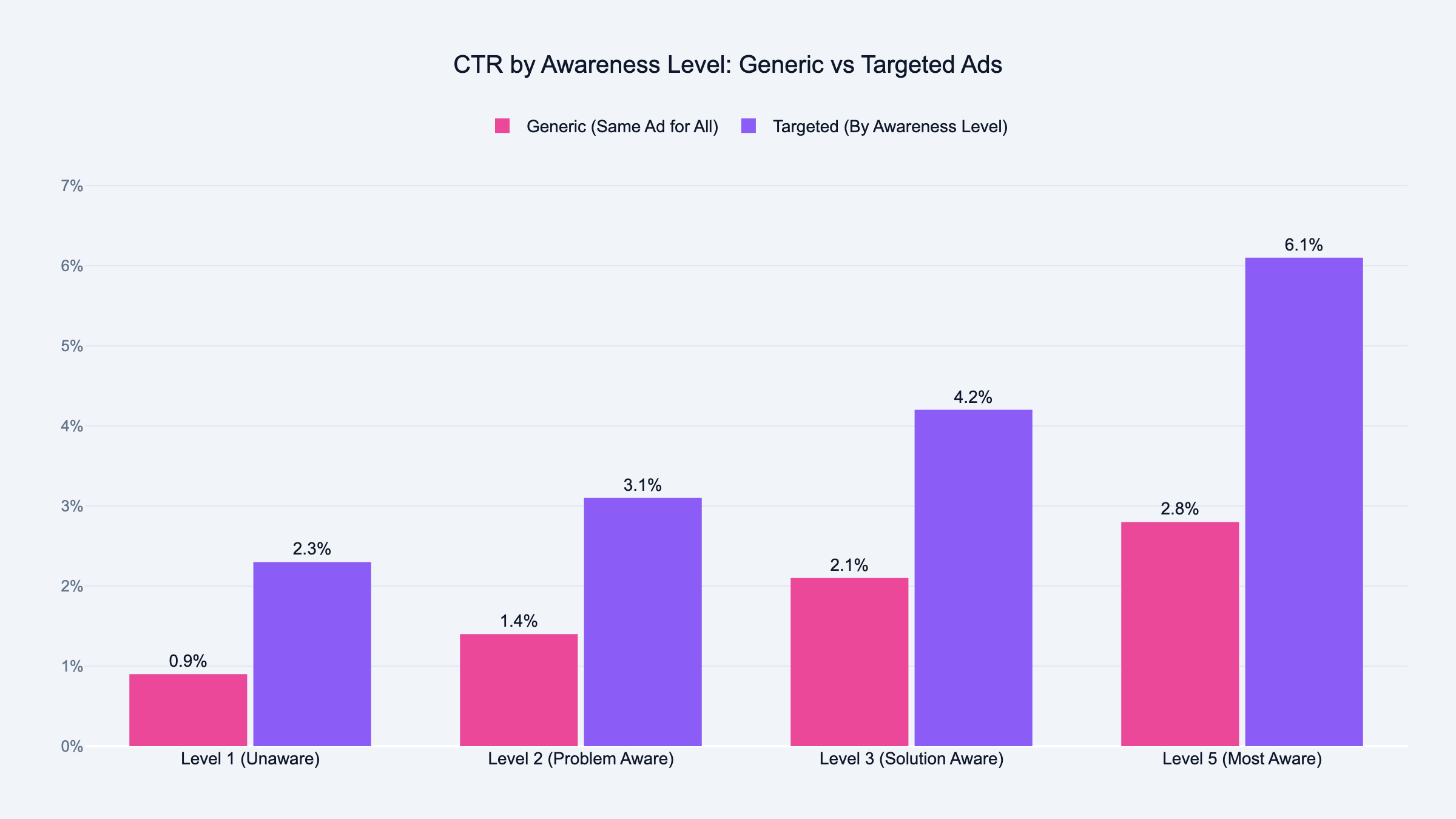
Victor explained it over coffee one morning. He breaks audiences into five awareness levels. Level 1 has no idea they have a problem. Level 5 is ready to buy right now.
Most advertisers write one set of ads and blast them at everyone.
That's like shouting "buy my product" at someone who doesn't even know they need it. Imagine someone screaming at you on the street about a solution to a problem you didn't know you had. You'd walk away. That's what most Google Ads do.
Here's how I use awareness levels with Claude:
Level 1 (unaware):
I tell Claude: "This person doesn't know they have a problem. Write a headline that names the pain they feel but can't articulate." The output focuses on symptoms, not solutions. Something like "Still spending Mondays pulling data into spreadsheets?"
Level 2 (problem aware):
This person knows something is wrong but hasn't searched for a fix. I prompt Claude: "Write a headline that validates the problem and makes them feel seen." Something like "Tired of guessing which campaigns actually drive revenue?"
Level 3 (solution aware):
The prompt shifts. "This person knows solutions exist but hasn't picked one. Write a headline that positions our tool as the obvious choice." Now the output is sharper. It names the category and differentiates.
Level 4 (product aware):
This person knows about you but hasn't pulled the trigger. I tell Claude: "Write a headline that handles the last objection. Give them a reason to act now." Something like "Free 14-day trial, no credit card, cancel anytime."
Level 5 (most aware):
Direct response copy. "This person knows us. They visited the site. Write a headline that closes." Short, direct, action-oriented.
Same client. Same AI. Five completely different ad sets.
Each one speaks to where the prospect actually is. Not where you wish they were.
I ask for 5 headlines per awareness level. That gives me 25 to choose from. I pick the best 2 from each level, adjust a word or two, and end up with 10 strong headlines.
For descriptions, I ask Claude to write 6 and pick the best 4. I always write one description myself. Just one. The one that captures the thing only a human who knows this client would say.
The AI brings variety. The human brings the soul.
Step 4: Edit Before You Upload
AI gets you 80% of the way there. The last 20% is yours.
I always adjust at least one word per headline. Sometimes I swap a word Claude used for a word the client uses. That small change makes the ad feel real instead of generated. You'd be surprised how much one word matters.
Three mistakes I see constantly:
Ignoring character limits.
Google Ads headlines are 30 characters. Descriptions are 90. If you don't tell Claude this in the prompt, it'll write beautiful copy that doesn't fit. Always include the character limit. Claude is good at this. ChatGPT tends to blow past it.
Writing all ads at the same awareness level.
If every headline speaks to Level 5 (ready to buy), you're ignoring 80% of your audience. Mix it up. Write ads for people who don't know you yet. And ads for people who visited your pricing page last week.
Skipping the human touch.
That mix of AI variety and one human-written description consistently outperforms fully human-written RSAs in my tests. Don't let the AI do everything. Write the one line that only you could write.
I also use what I call a "voice anchor." One sentence that captures the brand personality.
For a construction company: "This brand sounds like a foreman on a job site, not a marketing manager in a meeting."
For a SaaS client targeting agencies: "This brand sounds like a founder at a bar telling another founder what worked."
That one sentence does more than a full page of brand guidelines. I go deeper on this technique in my AI prompt engineering for PPC guide. Try it. You'll see.
Step 5: Test and Refresh
I refresh ad copy every 4 to 6 weeks. Not because the AI output gets stale. Because the audience data changes.
Every month, the search terms report shows new patterns. New words people use. New problems they mention. That fresh data goes into the brief. The brief goes into Claude. New ads come out.
The cycle is simple: pull data, update brief, generate ads, test, repeat.
Some agencies refresh quarterly. That's too slow. By the time you update, your competitors already adapted. I wrote about the future of PPC with AI and why this pace is only going to increase.
Monthly is the minimum. Biweekly is better if you have the volume.
One client, one session, five awareness levels. The whole process takes about 45 minutes.
Without AI, this used to take Victor a full day per client. Now imagine doing that for 10 clients. That's the difference. If you want to streamline the reporting side too, I covered automating Google Ads reporting with AI separately.
Frequently Asked Questions
Can Claude write Google Ads headlines that fit the 30 character limit?
Yes. Claude handles character limits better than any other LLM I've tested. Include "stay under 30 characters" in your prompt and it follows the constraint.
I still count characters on every headline before upload. But Claude rarely misses.
How do you get AI to stop writing generic ad copy?
Context. Give the AI a tone of voice document, an ICP description, and three examples of ads that already convert.
Generic output comes from generic input. The more specific your brief, the more specific the ads. It takes 15 minutes to build a brief and saves hours of rewriting.
Is AI-generated ad copy allowed by Google Ads policies?
Yes. Google doesn't prohibit AI-generated ad copy. They care about the content, not how it was written.
Your ads still need to follow all standard Google Ads policies. Misleading claims, trademarks, and restricted content rules still apply.
What data should you feed AI before writing Google Ads?
Three things. Search terms report from the last 90 days. Top converting ads from the account. And a one-page client brief with tone of voice and ICP.
The search terms report is the most important. It shows you the actual language your audience uses. Feed that language to Claude and the output matches how real people search.
How do you A/B test AI-written ads against human-written ads?
I run them in the same ad group. Three AI headlines, two human headlines, mixed into the same responsive search ad. Google rotates them and the data shows which combinations win.
After 2 weeks with enough impressions, I pause the lowest performers and generate fresh variations.
Does AI ad copy actually convert better than human-written copy?
In my experience, AI copy with a good brief converts about the same as strong human copy. The difference is speed. What takes a human a full day takes AI 45 minutes.
Where AI wins is variety. You can test 15 headline variations instead of 5. More variations means faster learning.
Can AI write ads for industries with strict compliance rules?
It can generate drafts. But for healthcare, finance, and legal, you need a human compliance review.
I use AI to generate the initial batch, then run every ad through the client's compliance team. Faster than writing from scratch. Still compliant.
Claude offers a free tier that handles ad copy well. ChatGPT free works too but the writing quality is lower for short-form copy.
For serious ad copy work, Claude Pro is worth it. The difference in output quality pays for itself after one client. I also compiled ChatGPT prompts for PPC managers if you want to compare approaches.
How do you handle multiple languages in AI ad copy?
I write the brief in English first. Then I tell Claude: "Translate these headlines into Spanish. Keep the tone casual. Stay under 30 characters."
For languages I don't speak, I always have a native speaker review. AI translation is good. It's not perfect.
Should you use AI for display ad copy or just search ads?
Both. Search ads benefit most because of the tight character limits. But display ad copy benefits from the same workflow.
Brief first, awareness levels, then generate. The only difference is display allows longer descriptions. Tell Claude the specific character limits and it adjusts.