How do you create AI SOPs for your marketing agency?
You pick one repeatable task, plan it with Claude, turn it into a skill, set a trigger word, and run it. When the output is not right, you talk to the skill in the same chat until it is. No code required. Here is exactly how I built mine.
I am not a coder.
I have never written Python. I cannot debug a script. I do not know what an API is beyond a rough idea.
And yet, last January, I built a complete automated workflow from scratch.
It pulls transcripts from our team meetings using Fireflies. Updates our product roadmap. Creates to-do lists. Scrapes industry news. Generates LinkedIn posts.
All by itself. Every morning.
The whole thing runs on one instruction file called a SKILL.md, sitting in a folder on my computer. Claude reads it every time the task runs. If you want to see how these skills fit inside a full agency knowledge base, I documented exactly that in how I built an AI brain for my agency with Claude Code.
That is what an AI SOP is. A single markdown file with plain-English instructions that Claude follows step by step.
If I can build it, your agency can build it. I cover the broader approach in my guide on building AI workflows for your marketing team.
What Is an AI SOP and Why Does Every Marketing Agency Need One?
An AI SOP is a plain-English instruction file that Claude follows step by step to complete a repeatable task. I write down what data to pull, what to check, and what output to produce. Claude runs it the same way every time. My agency needs them because reporting, audits, and summaries run automatically while we focus on strategy.
A standard operating procedure is a documented process. A way of doing something that does not depend on who is in the room.
An AI SOP is the same thing, with one difference: Claude follows it.
You write down what data to pull, what to check, what to flag, and what output to produce. Claude reads those instructions every time the task runs. It does not forget a step. It does not have a bad Monday.
For a marketing agency, that means weekly reporting, campaign audits, client performance summaries, content briefs, and keyword checks.
All running while you focus on the work only you can do.
How Do You Know Which Tasks Are Right for an AI SOP?
The right tasks follow the same pattern every week with the same inputs, process, and output. If I can explain it to a new hire in 20 minutes and they can follow it without calling me, it is an AI SOP candidate. Victor's Monday client reporting was the perfect example. Same data pull, same calculations, same summary, every single week.
Not every task should become an AI SOP. Some tasks need judgment. Those stay with you.
The right tasks follow the same pattern every single week.
Same inputs. Same process. Same output.
If you could explain it to a new hire in 20 minutes and they could follow it without calling you, it is a candidate.
The fastest way to find them: ask yourself what you dread opening on Monday morning.
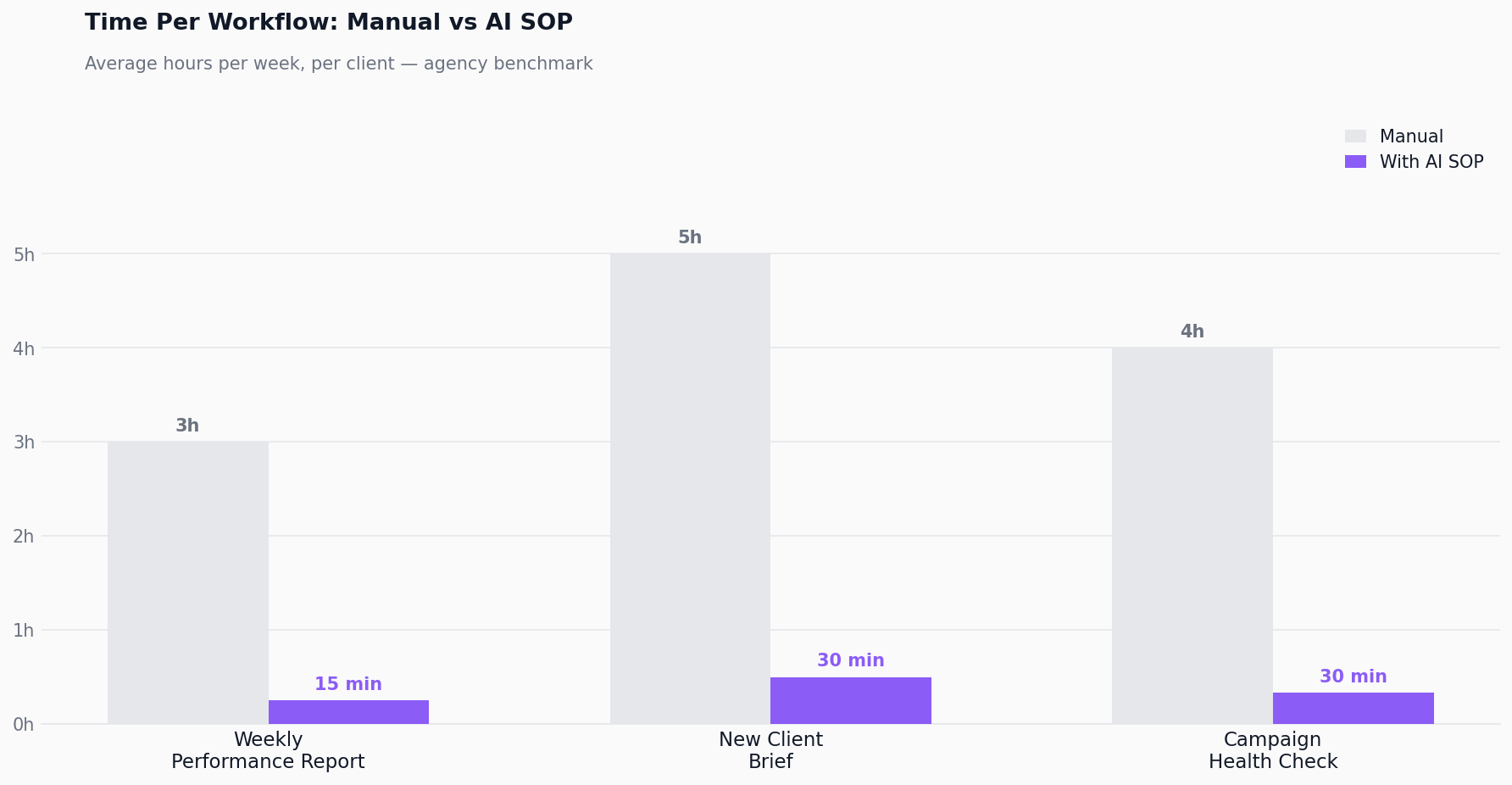
For Victor my co-founder, it was client reporting. Every Monday, same data pull, same calculations, same summary to the client. Two hours. Every week. I wrote a full guide on how to automate client reporting with AI that walks through the whole process.
That is a perfect AI SOP candidate.
Start with one task. Build one SOP. See if it saves you time. Then build the next one.
If you want to see how AI SOPs fit into the broader infrastructure of running an AI-powered agency — the tech stack, the ops layer, the delivery system — see my guide on how to build an AI-powered marketing agency.
How Do You Build an AI SOP Step by Step?
Six steps. All in Claude Cowork. No code.
Step 1: Decide which task to automate
Pick one repeatable task you run every week.
Client reporting. Campaign audits. Content briefs. Performance summaries.
The rule: same inputs, same process, same output. Every time.
Do not try to automate five things at once. Pick the one that eats the most hours. Start there.
Step 2: Plan it with Claude
Open Claude Cowork. Tell Claude what the task is.
"I do a weekly client report every Monday. It takes me two hours. I pull data from Google Ads, calculate CPL for each campaign, compare it to the 4-week average, flag anything that went up more than 20%, and write a one-paragraph summary for the client."
Then say:
"Can you ask me questions to refine this?"
Claude will ask things like:
What format does the client expect?
What tone do they prefer?
What data do you pull exactly?
What do you do when data is missing?
You answer. Claude builds the plan. By the end of this conversation, Claude knows every detail of the task.
Step 3: Turn it into a skill
Say: "Turn this into a skill."
Claude creates a SKILL.md file in your folder. This file contains all the instructions, the logic, and a trigger word you choose.
If you are not sure how skills work, say:
"I want to turn this into a skill. What are the next steps?"
Claude walks you through it.
The trigger word is important. It is the phrase that activates the skill every time you want to run it.
"Run the weekly report."
"Start the audit."
"Pull client numbers."
Pick something short that you will remember. That trigger goes into the SKILL.md file.
Step 4: Run the skill
Open a new chat in Claude Cowork with your folder selected.
Type your trigger word.
You see "the skill is loading."
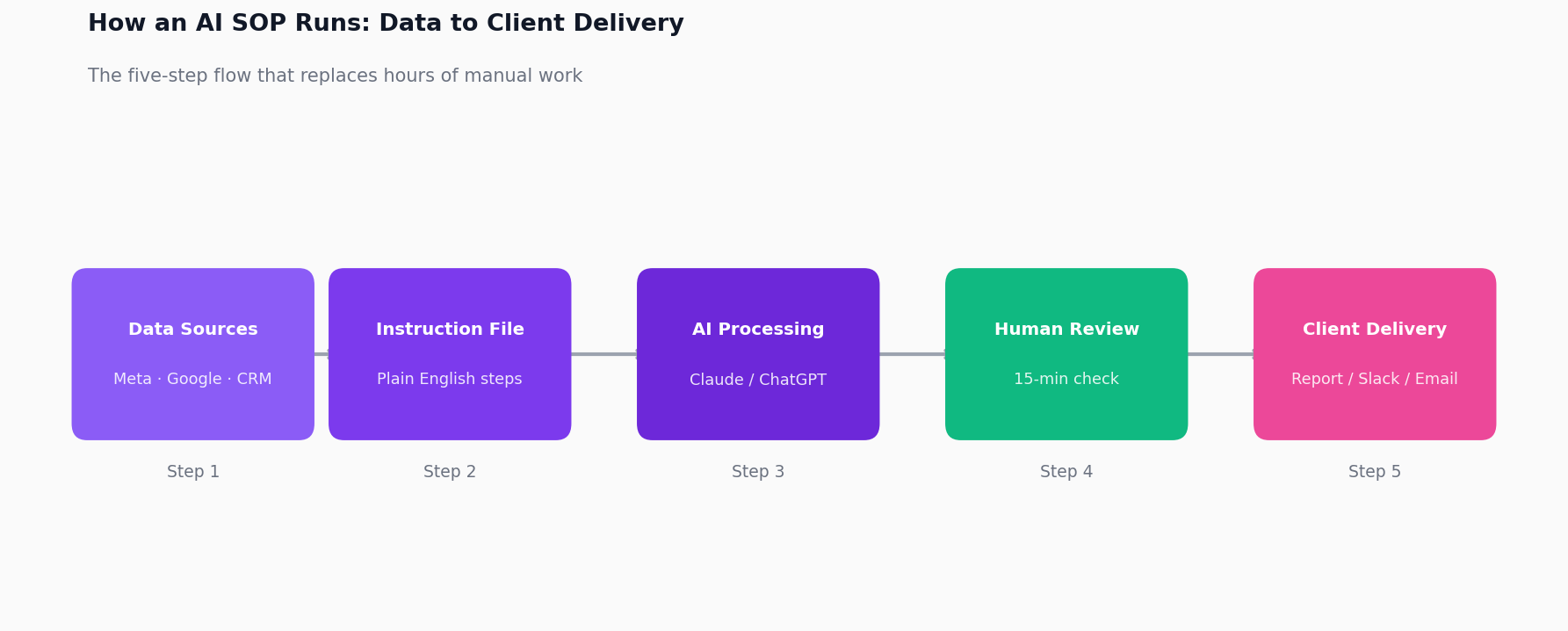
Claude reads the SKILL.md. Reads the data files in your folder. Produces the output.
The first time, the output will not be perfect. That is expected.
Step 5: Talk to the skill and refine it
This is where it gets good.
When the output is not what you want, talk to the skill in the same chat.
"Change the tone. This is too formal."
"Add a CPL column to the summary."
"Do not round the numbers."
"The client wants bullet points, not paragraphs."
Claude adjusts the skill and runs it again. Right there. Same conversation.
No switching tabs. No editing files manually. Just talk to it.
Here is what a real refinement loop looked like for my Monday reporting skill.
First run: Claude produced the right numbers but wrote paragraphs. My client gets bullet points. I said: "Output this as three bullet points max per campaign. Short. No full sentences."
Second run: bullets were too short. Missing context. "Add a one-line explanation for any campaign flagged as underperforming. Why did it flag?"
Third run: it flagged a campaign for wrong reasons. "Do not flag campaigns that are still in the learning phase. Check conversion count before flagging."
By run four, the output looked exactly like what I would have written myself. That version has run every Monday since without changes.
Step 6: Repeat until perfect, then move to the next
Keep running. Keep talking. Keep refining.
After four or five feedback loops, the skill produces exactly what you would have written yourself.
Once it is locked in, that task is done forever. It runs the same way every Monday without you touching it.
Then pick your next task and start from Step 1.
Frequently Asked Questions
What does a real AI SOP look like?
Here is the actual SKILL.md I use for my morning workflow at Sucana:
"You are my chief of staff.
Every morning, you will:
-
Read the Fireflies transcript from yesterday's team call
-
Pull out every action item and assign it to the right person by name
-
Update the product roadmap with anything that changed
-
Flag anything that needs my decision today
-
Write three LinkedIn post hooks based on anything interesting that came up"
My trigger word is "LFG."
I type it every morning. The skill loads. Five minutes later, my day is organized.
I built the whole thing in Claude Cowork.
How long does it take to build your first AI SOP?
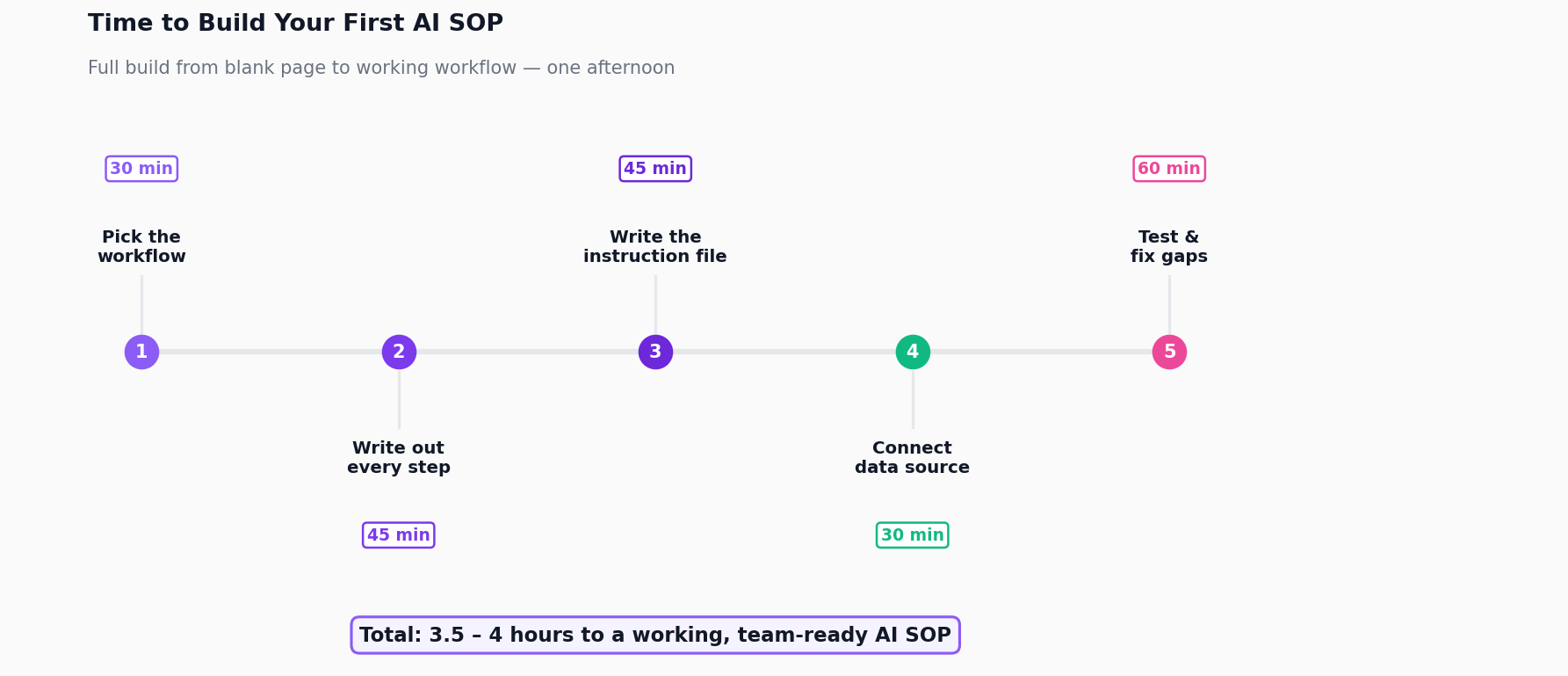
Planning with Claude: 15 minutes.
Turning it into a skill: 5 minutes.
Running and refining across the first three tries: about an hour.
Total: less than two hours to a working first SOP.
By my fifth one, I was getting them working in under 45 minutes.
Which tasks should stay with a human?
Strategy calls where a client is unhappy or a campaign is tanking.
Creative direction where judgment matters more than speed.
Any situation where invisible context from a previous conversation changes the answer.
AI handles the repeatable. You handle the irreplaceable.
What is an AI SOP for a marketing agency?
A plain-English instruction file called a SKILL.md that tells Claude how to complete a repeatable task.
You write down every step. Put your data in the same folder. Claude runs it the same way every time.
Same concept as a standard operating procedure, except Claude executes it instead of a team member.
Do I need to know how to code to create AI SOPs?
No.
Every SOP in this article was written in plain English inside Claude Cowork.
If you can explain a process in a Slack message, you can write a SKILL.md.
No Python. No APIs. No technical setup. For a broader look at the capabilities you need, see AI skills every marketer needs.
Which tasks should I turn into AI SOPs first?
Anything your team runs every week that follows the same pattern.
Campaign performance summaries. CPL alerts. Client reporting. Weekly updates.
Predictable inputs and predictable outputs. That is exactly where marketing automation AI works best.
How is an AI SOP different from a regular AI prompt?
A prompt is a one-time instruction.
An AI SOP is a documented, repeatable skill file. It has context, rules, a specific output format, a trigger word, and a connection to real data.
It gets tested, refined, and updated over time.
A prompt is improvised. An SOP is built.
I use Claude Cowork.
You open it, select a folder, and your SKILL.md files live there.
Type the trigger word and the skill runs.
The conversational feedback loop is what makes it work. You talk to the skill until the output matches your standard.
How do I know if my AI SOP is working correctly?
Run it three times on real data.
Compare the output to what you would have written yourself.
If the numbers match and the tone sounds like your agency, it is working.
If something is off, talk to the skill in the same chat. "Change this." "Fix that." Most issues are fixed in one or two feedback rounds.
Can AI SOPs replace account managers?
No.
AI SOPs handle the mechanical parts: pulling data, calculating metrics, formatting reports, flagging anomalies.
The relationship work, the judgment calls, the strategy conversations stay with humans.
AI SOPs free up account managers to do more of the work only a person can do.
How many AI SOPs should my agency build?
Start with one. Get it working, then build the next. I cover the full rollout approach in my marketing team AI adoption strategy.
Most agencies that try to build ten SOPs at once end up with ten half-working systems.
One SOP that saves two hours a week every week is worth more than five that are still being calibrated.
What is the biggest mistake agencies make when building AI SOPs?
They skip the planning step.
They try to write the instruction file without first talking to Claude about what the task actually involves.
The result is a vague skill that produces vague output.
Always plan first. Let Claude ask you questions. Then turn it into a skill.
How long before AI SOPs save meaningful time?
Most agencies see real time savings after the second or third run.
The first run always takes longer because you are reviewing carefully and giving feedback.
By the fourth or fifth run, the skill produces exactly what you would have written.
At that point, a two-hour task becomes a five-minute review.